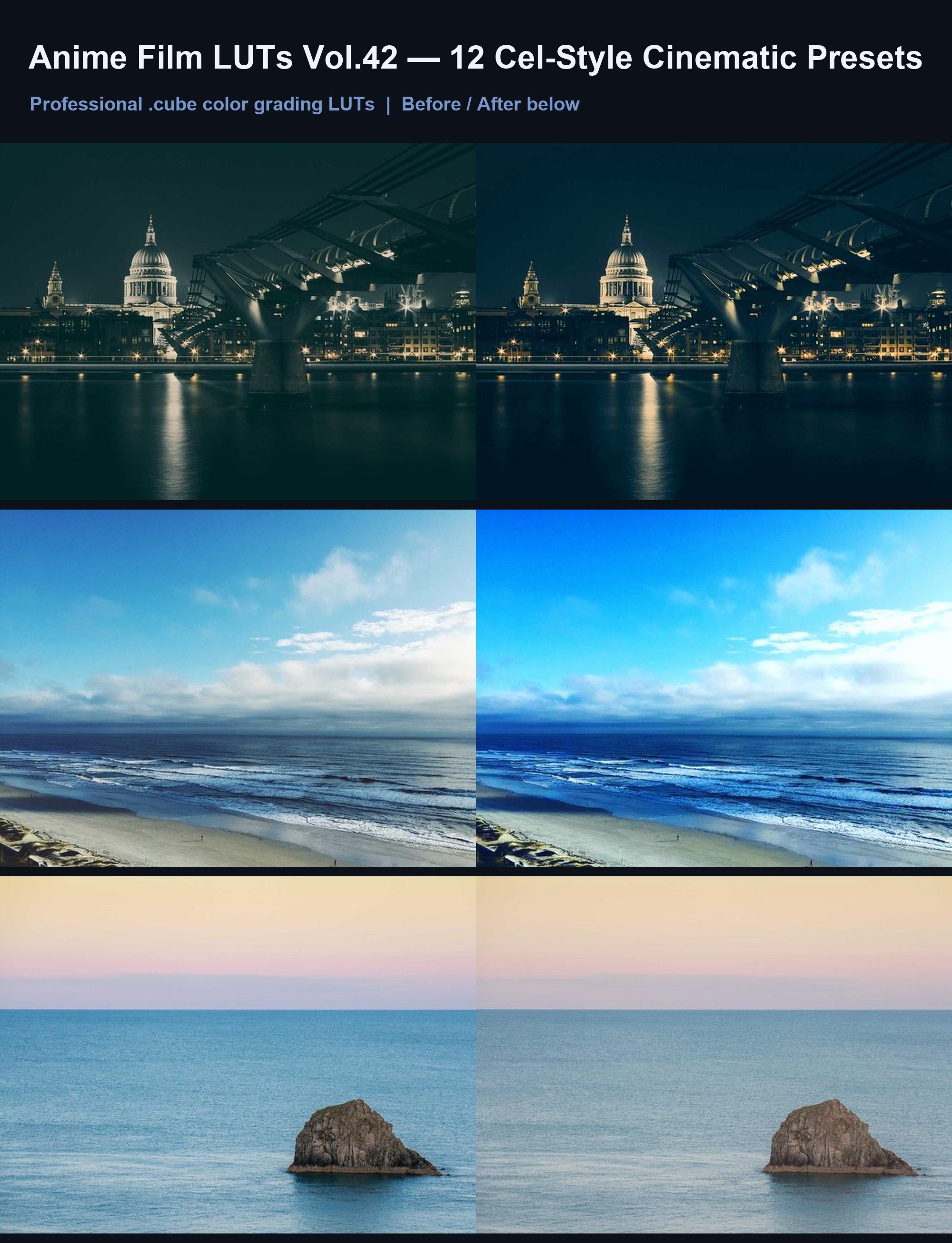



Anime Film LUTs Vol.42: 12 Cel-Style Cinematic Presets
Achieve a hand-painted anime aesthetic with 12 versatile LUTs for video and photo editing.
Why you'll love it
- 12 unique LUTs tuned for cel-shaded, hand-painted anime aesthetics.
- Universal .cube format compatible with CapCut, Premiere, DaVinci, FCP, LR.
- Instantly transform flat footage into vibrant, story-driven anime scenes.
- Balanced color science preserves skin tones while boosting stylistic impact.
- Works for both video sequences and still photography color grading.
- Instant digital download with lifetime updates and full commercial license.
What's included
Thank you for purchasing Anime Film LUTs Vol.42. This collection features 12 carefully crafted .cube LUT files designed to emulate the distinct color palettes of modern and classic anime. Each preset is engineered to adjust hue, saturation, and luminance to achieve a cohesive cel-style look without altering image sharpness or adding artificial textures. To import, locate the .cube files in your downloaded zip folder. In Premiere Pro, load them via the Lumetri Scope; in DaVinci Resolve, add them to your LUT library; in Lightroom, use the Color Grading panel. For CapCut, upload via the Effects > LUTs section. These presets are optimized for both HD and 4K footage and work across all major editing platforms listed above.